
Samsung Note 3: Review
Is a good enough phone to be used in this decade?
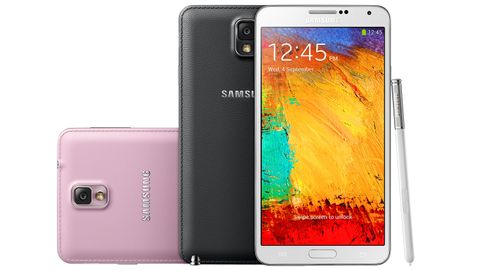 Those wanting to save even more money should consider the cheaper HTC Desire 816, but if you're set on buying a large phone and want the stylus to go with it, the Note 3 is the giant smartphone to buy for anyone looking to keep costs down.
There's no question that the Galaxy smartphone range has a shared design lineage, but the Note 3 still manages to stand out from the Samsung Galaxy S4 thanks to a more pronounced silver trim and a leather-effect back-plate, complete with faux stitching.
It's still made from poly-carbonate plastic, but the art decor-style ribbed chrome edges gives the phone a unique appearance. It's refreshingly different, unlike the slew of new handsets that are content to play it safe with only the bare minimum of changes. At 8.2mm thick you won't struggle to slip it in a pocket, despite the huge display.
That screen dominates the front of the phone, with just a Samsung logo above it and home, back and menu buttons below. At 5.7in the Note series continues to grow in screen size, but the slimmer horizontal screen bezels mean it's practically the same size as the Note 2. We could hold it quite comfortably, but needed to use our other hand to reach the far edges of the screen. You can perform many functions, like making a call or text one-handed, but it's really designed to be used with both hands at once.
Samsung has refined the software from the previous iteration, adding several new features such as Pen Window. With this you can create a window of any size by simply drawing a box on the screen and then choosing an app (from a limited but useful selection) to run within it. The scrapbook tool is much improved too, organising your cut-outs and clippings in a sensible order that's a lot easier to navigate through. The addition of tags, which can be searched system-wide, means you can categorise your notes into web links, photos, addresses and videos without worrying about losing them to the pile.


No comments:
Post a Comment